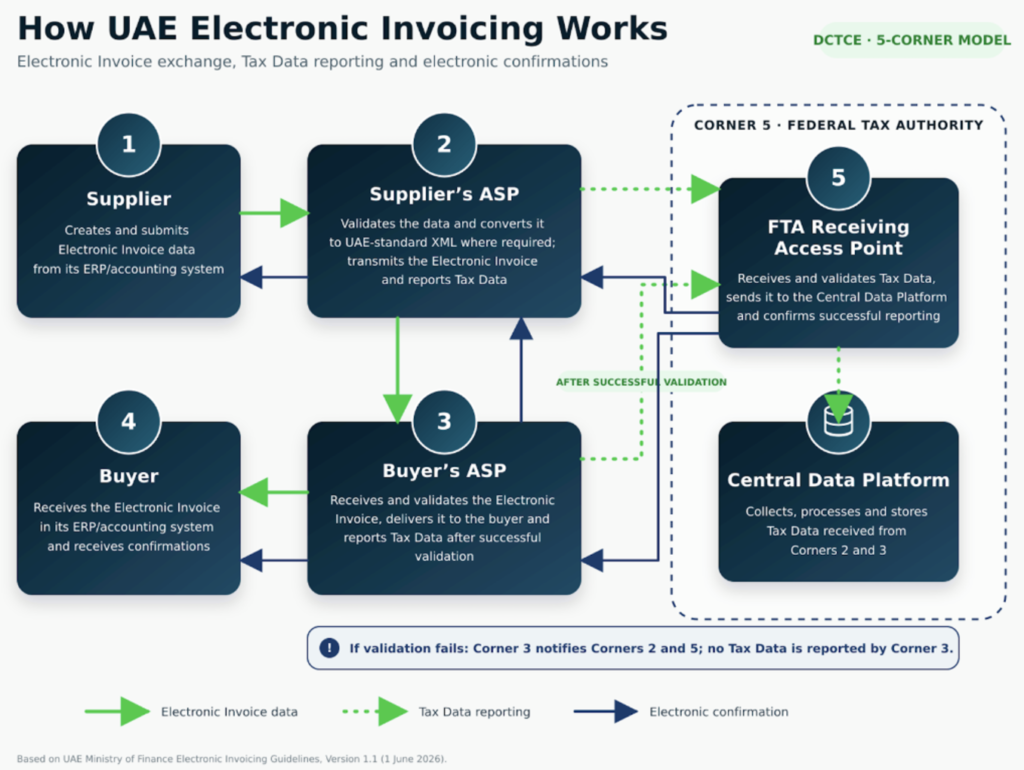
Every compliant invoice moves through five parties in a fixed sequence: supplier, two accredited service providers, buyer, and the Federal Tax Authority. Here is that sequence in plain, operational terms.
The UAE has adopted a 5-corner e-invoicing model based on Peppol, using the PINT-AE (Peppol International, UAE) data standard. Under Federal Decree-Law No. 17 of 2024 (Tax Procedures), Federal Decree-Law No. 16 of 2024 (VAT), and Ministerial Decisions No. 243 and No. 244 of 2025, no invoice moves directly from a supplier’s system to a buyer’s system, and no business reports tax data straight to the Federal Tax Authority (FTA).
Instead, five corners sit in the flow: the supplier, the supplier’s Accredited Service Provider (ASP), the buyer’s ASP, the buyer, and the FTA itself. Each invoice — and the tax data behind it — passes through this fixed sequence every time.
The e-invoice Journey, Step by Step
Supplier sends invoice data to its ASP
The supplier’s system — typically Dynamics 365 Business Central or Dynamics 365 Finance & Operations — sends invoice data to its own Accredited Service Provider in the format the two have agreed.
Supplier ASP validates and converts to PINT-AE XML
The ASP checks the invoice for completeness and accuracy, then converts it into the standard PINT-AE XML format where the source format differs from it.
The PINT-AE e-invoice is transmitted to the buyer's ASP
Once validated and standardized, the e-invoice is sent across the Peppol network to the buyer’s own Accredited Service Provider.
Tax data is reported to the FTA in parallel
At the same time as transmission to the buyer’s ASP, the supplier’s ASP reports the required tax data to the Federal Tax Authority — this step runs alongside delivery, not after it.
Buyer's ASP validates the incoming invoice
The buyer’s ASP checks the e-invoice against PINT-AE rules and confirms the outcome back to the supplier’s ASP, closing the first confirmation loop.
Buyer's ASP delivers the invoice to the buyer
Once validated, the buyer’s ASP delivers the invoice to the buyer in the format the two have agreed, and — if validation succeeded — reports its own tax data to the FTA.
The FTA confirms receipt to both ASPs
After successfully receiving tax data from each side, the FTA sends an electronic confirmation back to both the supplier’s ASP and the buyer’s ASP.
Each ASP forwards confirmation to its own business
The supplier’s ASP notifies the supplier and the buyer’s ASP notifies the buyer, closing the loop with a fully auditable trail on both sides.
Why the Sequence Matters
The parallel tax reporting step is the core compliance design of the model: tax data reaches the FTA at the same time the invoice reaches the buyer, not on a delayed batch cycle. If either ASP’s validation fails, tax data is not reported for that leg and the failure is flagged back through the chain — so the FTA only ever holds confirmed, validated data.
For a finance team, the practical implication is simple: the invoice you see in your ERP is already the confirmed, government-visible record. There is no separate reconciliation step to trust it.
The Five Corners at a Glance
Not sure where your ERP fits in this flow?
A Readiness Workshop maps your current Dynamics 365 setup against every step above and flags the gaps before your mandate date arrives.
No. The buyer’s ASP delivers the invoice to the buyer in whatever format the two have agreed — PINT-AE XML is the standard exchanged between the two ASPs, not necessarily what lands in the buyer’s inbox.
What happens if the buyer's ASP rejects the invoice?
The buyer’s ASP sends a failure confirmation back through the chain and does not report tax data to the FTA for that invoice, so no unverified data reaches the tax authority.
Can a business skip its own ASP and connect directly to the FTA?
No. Businesses cannot report directly to the FTA under the 5-corner model — every taxpayer must go through an Accredited Service Provider.
Does Dynamics 365 handle PINT-AE conversion natively?
No. Both Dynamics 365 Business Central and Dynamics 365 Finance & Operations require an ASP connector or add-on to generate, validate and transmit PINT-AE-compliant e-invoices.